
Tools
n8n vs Zapier vs Make: alternatives and which to choose for your company in 2026
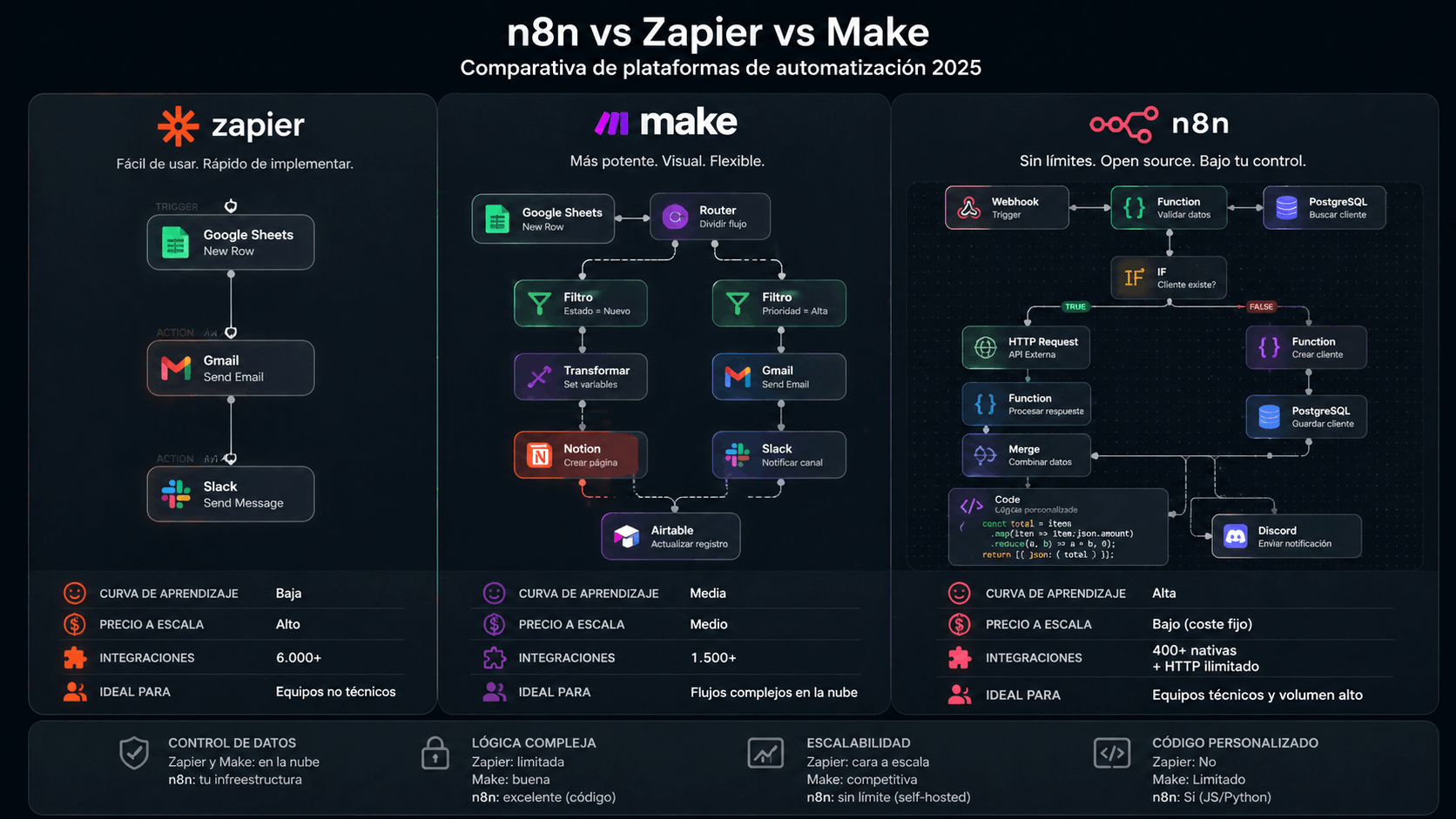
It’s nine at night and you’re still copying orders from a spreadsheet into the CRM by hand. Again. If you’ve made it here, it’s because you already know a machine can do that — and you’re deciding which one: Zapier, Make, or n8n. Let’s settle it, no fluff.
The short answer, so you don’t have to read the whole thing: pick Zapier if your team isn’t technical and you need something live today. Make if you want more power than Zapier without paying its price. n8n if you have technical capacity, handle sensitive data, or your automation volume justifies the fixed cost of self-hosting. Now with numbers.
Comparison summary
| Zapier | Make | n8n | |
|---|---|---|---|
| Learning curve | Low | Medium | High |
| Native integrations | 6,000+ | 2,000+ | 500+ and unlimited HTTP |
| Starting price | $19.99/mo | $12/mo | Free (self-hosted) |
| Price at scale | High | Medium | Low (fixed cost) |
| How it bills | Per task (action) | Per operation (step) | Per execution (whole flow) |
| Custom code | No | Limited | Yes (JS/Python) |
| Self-hosting | No | No | Yes |
| Data control | Zapier cloud | Make cloud | Your infrastructure |
| Best for | Non-technical teams | Complex cloud flows | Technical teams or high volume |
The detail almost nobody tells you: how each one bills
Here’s the fine print that decides your invoice. The three count usage differently:
- Zapier bills per task: each action it runs successfully.
- Make bills per operation (now “credit”): each step or module in your scenario.
- n8n bills per execution: one run of the whole flow, whether it has 3 steps or 30.
In practice: picture a 5-step flow that runs 1,000 times a month. On Zapier that’s ~5,000 tasks. On Make, ~5,000 operations. On n8n, 1,000 executions — and if you self-host, you’re not even counting that. So the more steps and volume your automations have, the more the gap widens in n8n’s favor. It’s not a footnote: it’s the number-one reason high-volume companies migrate.
Zapier: the most accessible
Zapier is the best-known no-code automation tool out there. It’s been around since 2011, has 6,000+ native integrations, and an interface anyone can use in minutes. A “Zap” connects two apps with a trigger and one or more actions. If you’ve never automated anything, this is where you start in an afternoon.
Zapier pricing in 2026
| Plan | Price | Tasks/month |
|---|---|---|
| Free | $0 | 100 |
| Professional | from $19.99 | 750+ (adjustable) |
| Team | from $69 | multi-user |
| Enterprise | contact sales | custom |
Remember it bills per task. A flow processing 1,000 records a day can eat 30,000 tasks a month — enough to jump plans without noticing.
Pick it if your team isn’t technical, you need fast results, your integrations are all in its catalog, and your volume is low-to-medium (under ~10,000 tasks/month).
Think twice if volume grows: price climbs in a straight line with tasks, conditional logic falls short of Make or n8n, and your data always passes through Zapier’s servers.
Make: visual power at a reasonable price
Make (formerly Integromat) is a cloud platform with a visual editor considerably more advanced than Zapier’s. You build flows as diagrams where you add conditions, iterators, aggregators, and data transformations without writing code. It’s the middle ground: more muscle than Zapier, less demanding than n8n.
Make pricing in 2026
| Plan | Price | Operations/month |
|---|---|---|
| Free | $0 | 1,000 (2 scenarios) |
| Core | $12 | 10,000 |
| Pro | $21 | 10,000 + advanced features |
| Teams | $38 | 10,000 (multi-user) |
| Enterprise | contact sales | custom |
Pick it if you need flows more complex than Zapier allows natively, you work with data you must transform or filter before sending, and you want more operations per dollar.
Think twice if your team won’t learn a slightly more technical interface, or if you need to self-host (Make doesn’t allow it).
n8n: automation for people who want control
Here’s where we take a side, because it’s what we do daily. n8n is an open-source automation tool with a fair-code license, and its core difference from Zapier and Make is one thing: you can install it on your own server. That means two big things — your data never leaves your infrastructure, and the cost stops scaling with volume. You pay for infrastructure, not operations.
It has 500+ native connectors, but its HTTP node connects to any authenticated API, so in practice it integrates with almost anything. And it lets you drop JavaScript or Python inside the flow for logic no visual interface handles well. It’s the tool we use to build our clients’ systems when the case genuinely calls for control and scale.
n8n pricing in 2026
| Option | Price | Limit |
|---|---|---|
| Community (self-hosted) | Infrastructure only (~$10–50/mo on a VPS) | No execution limit |
| Starter cloud | €20/mo | 2,500 executions |
| Pro cloud | €50/mo | 10,000 executions |
| Business cloud | €667/mo | 40,000 executions + self-host |
| Enterprise | contact sales | custom |
Pick it if you handle sensitive data that can’t pass through third parties (health, legal, financial), you have a technical profile or someone to manage self-hosting, volume is high, or you need code-level logic and integrations with APIs that have no native connector.
Think twice if there’s nobody technical around: setting up and maintaining self-hosting has a curve, and community support — while good — is less extensive than Zapier’s.
Getting started with n8n
A worry that comes up a lot: n8n has more of a learning curve than the others, and its interface is developer-flavored. Don’t let it stop you. The nodes are visual, the docs are solid, and there’s a big template library — you learn most of it by copying a template close to your case and adapting it step by step. The short path: spin up a test instance (n8n cloud, or Docker on a VPS), clone a template, and rebuild it around your process.
And if you’d rather not wrestle with the server side: at IA Operators we build on n8n every day. Being an n8n expert isn’t memorizing nodes — it’s knowing what to automate, in what order, and how to make it survive production. We set it up, document it, and train your team so they don’t depend on us forever.
Real use cases: which tool for each scenario
Sync CRM → email marketing. Standard case, native integrations in all three. If marketing runs it without IT, Zapier is fastest. Make if the flow has conditions (segments, scoring).
Forms with data enrichment. When a form fires calls to several APIs, enriches the data, and distributes it to multiple systems, Make or n8n handle the logic far better than Zapier.
Reports from multiple sources. Pulling from 5 systems, transforming, aggregating, and generating a report is n8n territory: a bit of JavaScript inside the flow saves you chaining fifteen steps.
Proprietary APIs or legacy systems. If you need to connect to an internal API or an old ERP with no native connector, n8n’s HTTP node solves it more directly than the workarounds you’d need in Zapier.
Non-IT teams that need to automate in hours. Zapier. Its templates and one-step editor are the shortest path for the standard stuff (an email when someone fills a form, a task when a ticket comes in).
What actually matters isn’t the tool
We’ll be honest with you: choosing between n8n, Zapier, and Make is secondary. The question that moves the needle is a different one — which of your company’s processes are worth automating, and in what order?
Plenty of companies automate what’s easy to automate, not what creates the most value. They end up with twenty flows that each save half an hour here and there but don’t change the business. Before picking a tool, map which processes cause the most friction, which repeat, and which have the clearest ROI. The tool is the last step. (If it helps, we have a guide on how to prioritize with a technology roadmap.)
Rather we build it for you? Tell us what’s eating your time and we’ll tell you whether it’s worth automating — no strings. Check out our AI automation for companies service: AI agents, API integrations, and custom n8n flows.
Frequently asked questions
What is n8n and what is it for?
n8n is an open-source automation tool that connects your apps and APIs so repetitive tasks (copying data, sending alerts, syncing systems) run on their own. What sets it apart from Zapier or Make: you can install it on your own server, so your data never leaves your infrastructure and the cost doesn't grow with volume.
Is n8n free?
Yes, the Community Edition is open-source and free if you self-host it (you only pay for infrastructure, around $10–50/mo on a VPS). The cloud version starts at €20/mo (Starter plan, 2,500 executions). For high-volume companies, self-hosting n8n saves thousands per year versus Zapier or Make.
What are the best n8n alternatives?
The tools most similar to n8n are Zapier (easiest, most integrations, but priciest at scale) and Make (powerful and cheaper than Zapier for complex flows). If you specifically want open-source and self-hostable like n8n, there are also Activepieces and Windmill, though with smaller communities.
n8n or Zapier: which is better for a company?
Zapier if your team isn't technical and you want something live today. n8n if you have a technical profile, handle sensitive data, or your volume justifies the fixed cost of self-hosting. The price difference at scale is huge because Zapier bills per action and self-hosted n8n doesn't bill by volume.
Can n8n replace Zapier?
For many use cases, yes. n8n covers most of what Zapier does through its native connectors and its HTTP node (which reaches almost any API). The real limits are the learning curve and a handful of niche integrations that only exist in Zapier.
Next steps
Ready to act?
Diagnosis, prioritization and execution — no hand-offs. The same team that maps the problem builds the solution.

Founder, IA Operators
LinkedIn